Skip to main
University-wide Navigation

Welcome

Ergonomics is the science and study of work, work methods, and the influences that the work environment has on job performance. Application of ergonomic principles in the design of the workplace can improve a work environment’s safety, productivity, and efficiency. Provided are on-site and virtual work site analyses. Recommendations made during such evaluations may improve working comfort and efficiency. Workforce training on office ergonomics is available, and Employees are encouraged-when offered- to attend a basic training course on Office Ergonomics. The Ergonomics Program also partners with other University groups to promote practices that improve worker health and safety as well as speedy workforce returns from job related injuries. If you would like to schedule a customized ergonomics training program for your area or need an ergonomics assessment submit a request by emailing Marty Dagostino - mda402@uky.edu
 

Computer Work & The Adjustable Height Worktable

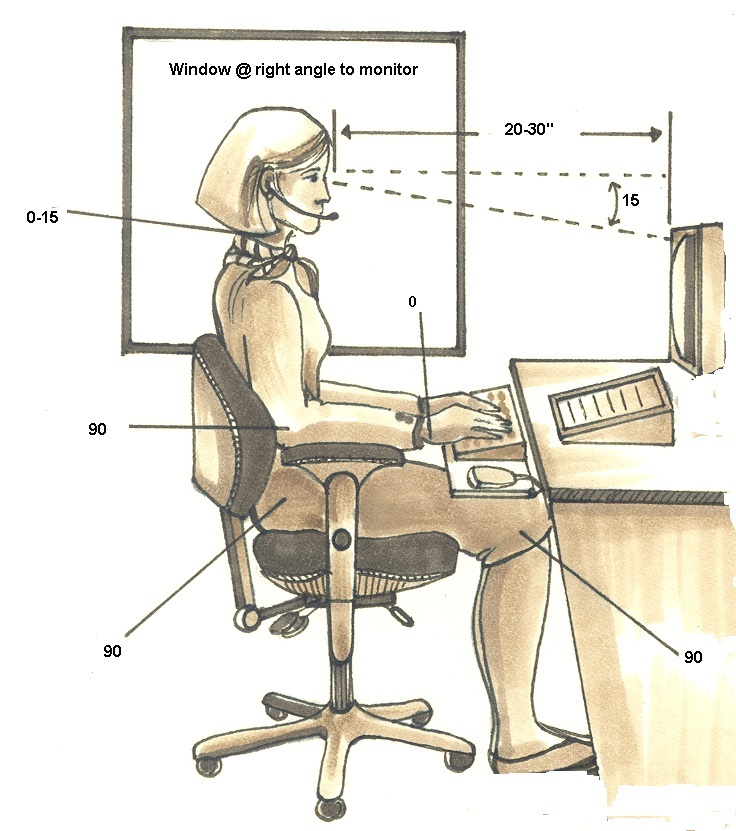
During continuous-or prolonged-computer work organizing one’s workstation so that the alignments illustrated in Efficient Computer Work Alignments- which promote comfort and productivity- are recruited. 

When seated for long periods, maintain complete foot floor contact with back to backrest support. If the chair provides lumbar adjustment, beltline position this support. A chair's armrests should be easy to raise, lower, and pivot toward and away from our sides. They should also be comfortably padded and rounded at outer margins. For maximum comfort, adjust armrests so that forearm support is secured and so that the neutral upper extremity alignments depicted in this page's Efficient Computer Work Alignments are recruited. Take time to understand your chair and become familiar with the adjustments provided. Most reputable chair manufacturers have websites that link to how to adjust videos.

The height of a workstation’s keyboard and mouse are as important an office ergonomics work variable as exists. In general, the level of input devices should dictate lowered shoulder recruitments in which arms are in contact with the body and forearms intersect upper arms at 90°. Hand & wrist alignments at the keyboard should be straight/neutral, the mouse needs situated at the same height/level as the KB and with any reach to the pointing device abbreviated.

The computer screen(s) should be centered so that during viewing seated twists and turns of the trunk and head are not required. Screen distance - whether seated or standing - should be arms - length away and so that the display’s top aligns in the range between the eyebrows, to tip of nose. The human head is a heavy structure accounting for about 12 pounds of total body weight . Keeping this in mind know that a screen viewing that results in a slight forward tilt of the head is preferable. A too high screen can lead to undesirable chin up viewing recruitments . Avoid left and right of center display positioning.

While the height of the keyboard, pointing device and screens rise during standing office work, the neutral upper extremity alignments recruited described above and during seated work should not. That said, many find a slightly lower standing KB height and one that dictates the so-called “negative tilt” of the hands and wrists preferable. Experiment with different standing levels to find the best feel. Standing office work is not for everyone and while in recent times, a rush to deploy the standing workstation has been a common office work environment trend, evidence that standing in one place and performing office work is better or healthier for us has detractors and has yet to be empirically supported. During the workday, change positions as often as is feasible. 

Efficient Work Practices

Make sure to regularly- and often- change positions throughout the workday. Postural alignment changes serve to adjust and redistribute joint, muscle & circulatory demands and aide in promoting physical and mental well-being.
Remember to structure the workplace in a way that encourages the recruitment of efficient work postures. Reference the illustrations at Efficient Computer Work Alignments on how to set up and structure the computer workstation in a way that optimizes positional efficiency.
Incorporate two 15-minute breaks into the workday and sandwiched around the lunch hour. Leave the workstation during these breaks and- if possible- take a brief stroll.
After 20-30 minutes of continuous screen viewing, take a mini 60 second break and turn the gaze away from monitors. Turn viewing focus to an object in the distance and hold that gaze for a minimum of 20 seconds. This break- for our eyes- is referred to as the 20-20-20 rule.  Every 20 minutes, gaze at something 20 feet away for 20 seconds.
Leave the computer workstation at the lunch break.
Visit Ergo Break to view a few suggested stretches and try to incorporate these into an every workday routine. Ergo Break

Efficient Computer Work Alignments

Wellness

UK Human Resources offers a variety of programs and resources to employees.

Visit Work-life & Well-being to find resources available to UK employees.

Organizing the computer workstation as illustrated assists in promoting efficient work practices and recruitments.

Efficient Computer Work Alignments

Efficient Computer Work Alignments